Here’s how the stakeholder update usually goes. You open a new chat, upload the latest PRD or design doc so the AI has something to work with, type “help me write a stakeholder update for my ecommerce redesign project,” and get back three paragraphs that are technically correct and completely generic. You spend the next 20 minutes editing them into something that sounds like it was written by a person who actually knows what’s happening.
That’s not an AI problem. That’s a setup problem.
Every time you open a new chat window, the AI starts from zero. Uploading a PRD gives it product context — what you’re building and why. What it still doesn’t have is you. It doesn’t know who your stakeholders are, how you communicate with them, what your team’s norms are, or what “good” looks like on your project. You’re talking to a brilliant stranger who has read the spec but hasn’t met anyone on the team.
Frequency doesn’t fix this. Using AI every day without setup is like showing up to the same meeting every week and re-introducing yourself at the start. The AI isn’t getting to know you. It’s getting your prompt.
The fix isn’t a better prompt. It’s a workflow. And building one takes about 90 minutes.
Thanks for reading!
Subscribe to The Product Foundry by Doug Seven to get articles like this in your inbox.
The Three Things Your AI Workflow Actually Needs
A PM AI workflow has three components. None of them require technical skills. All of them are writing.
1: Your context document (20 minutes)
This is a short written brief about you — your role, your product, your stakeholders, and how you communicate. Think of it as the briefing you’d give a smart new colleague on their first day so they could be useful by end of week. Two or three focused paragraphs is enough.
If you’re not sure what to put in it, don’t stare at a blank page. Open Claude and ask it to interview you. Paste this prompt to get started:
I want to build a reusable context document for my PM workso you can help me more effectively. This document willdefine two things: the Context I operate in and the ToneI expect in our work together — using the framework fromAgentic AI 101https://dougseven.com/2026/04/23/agentic-ai-101-from-prompts-to-skills-to-agents/. Please interview me to collect what you need. Ask me onequestion at a time and wait for my answer before askingthe next one.For Context, cover: my role and seniority, the product I'mbuilding and who its users are, my team structure, my keystakeholders by name and what each one cares about most,my company and industry, and where my current projects arein their lifecycle.For Tone, cover: how formal or casual my writtencommunication typically is, whether I want you to push backon my thinking or primarily execute on my direction, how Ilike to receive feedback, any specific things AI toolstypically do that I find annoying or unhelpful, and what"good" looks like to me — you can ask for examples of writingI consider strong.Once you've asked everything you need, synthesize my answersinto a structured context document with two clearly labeledsections: Context and Tone. Keep it concise — the goal issomething I can paste into a system prompt, not a biography.
You just answer naturally. Claude asks the questions, you give it the raw material, and it synthesizes a document you’d have spent an hour writing from scratch. Fifteen minutes of conversation.
Here is an example of some of the questions Claude asked me after using that exact prompt:
What product are you specifically building, and who are its primary users? For example, is it an IDE, a code review tool, a CI/CD platform, an AI coding assistant — and are your users hobbyist developers, enterprise engineering teams, open source contributors, something else?
What does your team look like? Who reports to you or works alongside you directly — designers, engineers, marketers, data analysts? And roughly how big is the team you’re working with day-to-day?
Who are your key stakeholders, and what does each one care about most? Give me names and titles if you can, and a quick sense of what success looks like to each of them — what are they watching, worried about, or pushing for?
How formal or casual is your typical written communication at work? For example, do you write tight, professional prose for everything, or do you shift registers — more casual in Slack, more structured in docs — and where does most of your important communication happen?
When you bring me a problem or a direction, do you want me to push back on your thinking — challenge assumptions, poke holes, offer alternatives — or do you primarily want me to execute on your direction and trust that you’ve already done the thinking? Or somewhere in between?
…and so on. This produced a 312 word Markdown document with a “Context” section and a “Tone” section. The questions are specific to your context, and the answers you give are what make the final document yours. You don’t have to know what to write. You just have to know how to answer questions about it.
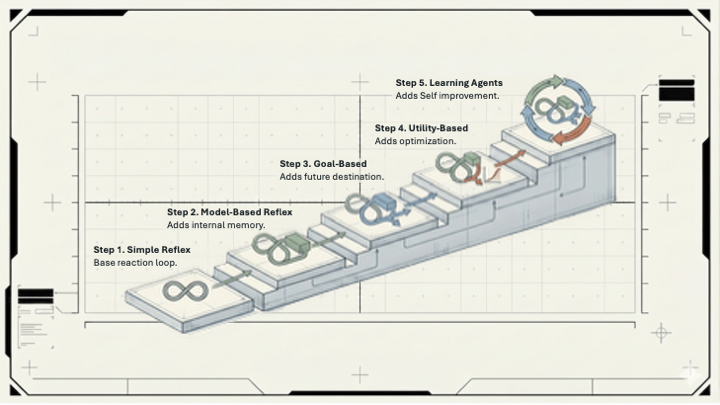
What you end up with maps directly to two of the six factors from Agentic AI 101 — Context and Tone — but tuned to you specifically rather than to a generic task. The other four factors (Role, Scope, Format, Error Handling) will vary by task, which is why they live in the task library instead.
2: Your recurring task library (30 minutes)
Every PM has three to five tasks they run every week in the same shape. The ones that show up most consistently: stakeholder updates, research synthesis, user story drafts, competitive landscape summaries, and meeting prep notes.
For each task you want to systematize, write a paragraph of standing instructions. What format does the output take? What length? What tone — is this going to your VP or your engineering team? What should it always include, and what should it leave out? What does a good version look like versus a mediocre one?
You can even ask Claude to help with this:
Write a task instruction for Stakeholder updates.They should be three short paragraphs:1. Status (one sentence on where we are)2. Progress since last update (two to threesentences on what moved)3. Blockers or risks (one to two sentences,only if relevant).Tone is direct and professional — Sarah reads theseon her phone between meetings. Lead with the mostimportant thing. Never use passive voice. If there'sa decision needed from her, state it explicitlyin the last line.
Here’s a real output:
Task: Stakeholder Update — SarahWrite a stakeholder update in three short paragraphs.Paragraph 1 — StatusOne sentence. State where the project stands right now. Lead with the most important thing. Active voice only.Paragraph 2 — Progress Since Last UpdateTwo to three sentences. Describe what actually moved — decisions made, work completed, signals received. Be specific. No filler. Active voice only.Paragraph 3 — Blockers or RisksOne to two sentences. Only include this paragraph if a real blocker or risk exists. Skip it entirely if there isn't one. Active voice only.Decision lineIf Sarah needs to make a decision or take an action, state it explicitly as the final line. Format: "Decision needed: specific ask." If no decision is needed, omit this line entirely.Constraints Never use passive voice No stage-setting or preamble — the first word should matter Sarah reads this on her phone between meetings; if it requires scrolling, it's too long Professional but not corporate — write like a sharp human, not a press release
The prompt instruction took a couple minutes to write. Claude gave me a more polished and complete task instruction that I could edit if I need to…and it means you never have to explain it again. The AI knows what a good stakeholder update looks like for your context. You bring the facts. It brings the format.
Build this out for your top three recurring tasks. That’s 30 minutes at 10 minutes per task, including the time to think through what “good” looks like — which is useful on its own, separate from any AI benefit.
3: The assembly (40 minutes)
Where you put these two documents depends on which tool you’re working in, but the result is the same: Claude starts every session already briefed.
If you’re using Claude.ai, the right place is a Project. In the project view, you can add Project Instructions — a system prompt that loads automatically at the start of every conversation in that project. Paste your context document and task library there. Every conversation you start inside that project begins with Claude already knowing who you are, what you’re working on, and what your outputs should look like. You can also upload persistent files — your PRD, your roadmap, your stakeholder list — so they’re available without re-uploading each session.
If you’re using Claude Cowork, the setup is similar but you also get workspace folder access, which means Claude can read and reference files directly from your computer. Your context document can live as an actual file in your project folder. The practical effect is the same — Claude shows up having done the reading — but Cowork gives you tighter integration with the documents you’re already working from.
Either way, spend the remaining time in this block doing a test run. Take a real task from this week, give Claude only the new information specific to that task, and see what comes back. The first run will show you what’s missing from your setup. Adjust and run it again. That iteration is the most valuable part of the 40 minutes.
What the 90 Minutes Looks Like in Practice
20 minutes to build your context document using the interview technique. 30 minutes to write task instructions for your three most common recurring tasks. 40 minutes to set up your Claude Project or Cowork workspace and do your first real test run.
You’re not configuring software. You’re writing three things: a brief about yourself, a set of instructions for your most common tasks, and then checking that it works. That’s the whole setup.
What Changes After You Do This
Two things shift once the setup is in place.
The quality of AI outputs stops being random. Instead of getting something generic you rewrite from scratch, you get something consistent you edit. Editing is a different cognitive task than rewriting. It’s faster, and it’s easier to know when you’re done.
The overhead drops. You stop spending mental energy re-explaining your context every session. The AI shows up having done the reading. You show up and work.
Neither of these is a dramatic transformation. They’re just a better baseline. The system gets more useful as you refine it. You’ll have plenty of reasons to.
Your Assignment This Week
The first 20 minutes of the 90. Open Claude and ask it to interview you for your context document. Three questions it needs to answer: What are you building and for whom? Who are your key stakeholders and what do they each care about? How do you communicate — with whom, in what format, in what register?
That interview is the foundation. Everything else builds on top of it: the task library, the project setup, the test run.
This is where you build the skill that’s specifically yours. Not a generic PM assistant. One tuned to your product, your stakeholders, your communication style.
That’s what makes it actually work on Tuesday morning.




Leave a comment