Using NotebookLM Audio Overviews
Most PMs don’t have a reading problem. They have an absorption problem. The competitive analyses, the team status updates, the analyst reports, the design review notes. The material is there. The problem is that reading forty pages of documents that weren’t designed to talk to each other requires a kind of focused, uninterrupted time that most PM calendars don’t reliably produce.

NotebookLM doesn’t solve that by summarizing faster. It solves it by changing the medium.
NotebookLM is Google’s AI research assistant, free at notebooklm.google.com. The core mechanic: create a notebook, add your sources, and interact with those sources through chat and a set of generated outputs. What sets it apart from general-purpose AI assistants is that it grounds itself strictly in what you upload. It won’t search the broader internet to fill gaps in your sources. If the answer isn’t there, it tells you rather than generating something plausible. Every chat response comes with inline citations pointing back to the exact text it drew from. You can verify the reasoning, not just trust the summary.
For PM work, that constraint matters. You’re not working with a model that’s blending your team’s strategy documents with everything it absorbed during training. You’re working with a model that read exactly what you gave it and nothing else.

Thanks for reading!
Subscribe to The Product Foundry by Doug Seven to get articles like this in your inbox.
Subscribe on Substack →What You Can Put In
The source types are broad enough to handle most PM research workflows without workarounds. NotebookLM accepts PDFs, web URLs, Google Docs, Google Slides, spreadsheets, audio files, YouTube video transcripts, Word documents, CSV files, images, and plain pasted text. Each notebook holds up to 50 sources, with each source supporting up to 500,000 words or 200MB.
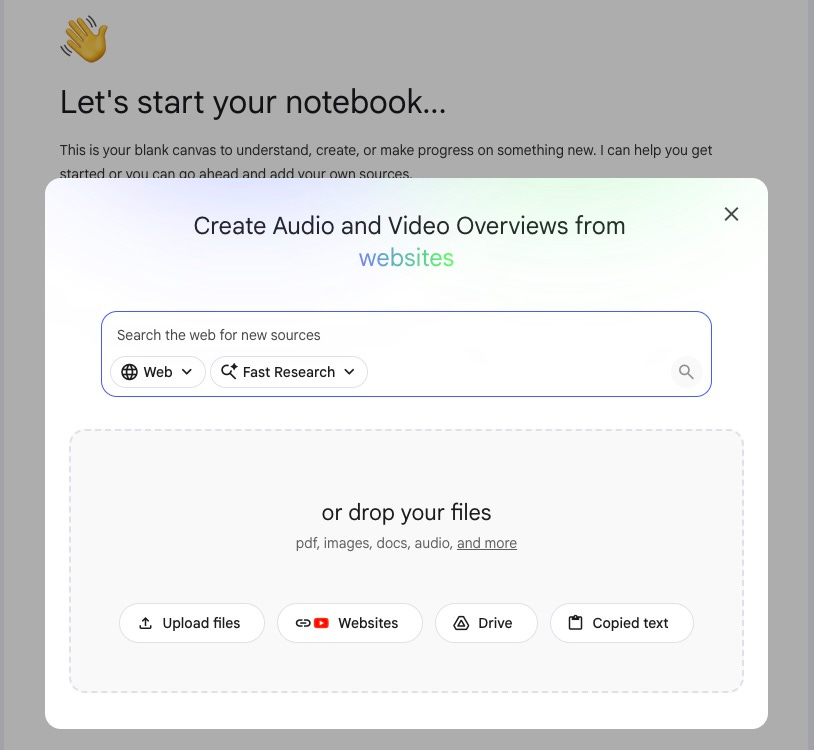
In practice: you can build a competitive intelligence notebook from a competitor’s product site, their most recent earnings call transcript (find it on YouTube and paste the URL), a couple of analyst reports, and some recent press coverage, all in the same notebook. NotebookLM auto-labels and categorizes sources when you have five or more, which helps when the notebook gets dense.
For Google Docs, there’s a sync button that pulls in changes from the original file when it’s been updated. Useful if you’re tracking a living document over time. Everything else is a static copy captured at the time of upload.
One practical note on the 50-source cap: if your research exceeds it, you can consolidate before uploading. Use Claude or Gemini to merge related documents into combined files organized by theme or tier. You lose some granularity in citations, but you keep the full content inside the notebook. More on this in the example below.
What You Get Out
Chat is the immediate output. You can ask questions, request summaries on specific topics, or give instructions. Responses include inline citations that navigate directly to the quoted passage in your source. If you ask about something your sources don’t cover, it says so rather than reaching.
The other outputs live in the Studio panel on the right side of the interface. NotebookLM can generate mind maps, slide decks, infographics, flashcards, quizzes, reports, and data tables from your sources. I use some of these. The Audio Overview is the one I use most, and the one that actually changed how I handle information.
The Audio Overview
The default Audio Overview format is called Deep Dive: a conversation between two AI hosts who unpack your source material the way a good podcast does. They connect themes across documents, surface tensions between sources, and raise questions that straight reading wouldn’t have prompted. It doesn’t sound like text-to-speech narration of a bullet list. It sounds like two people who actually read what you uploaded and found it interesting.
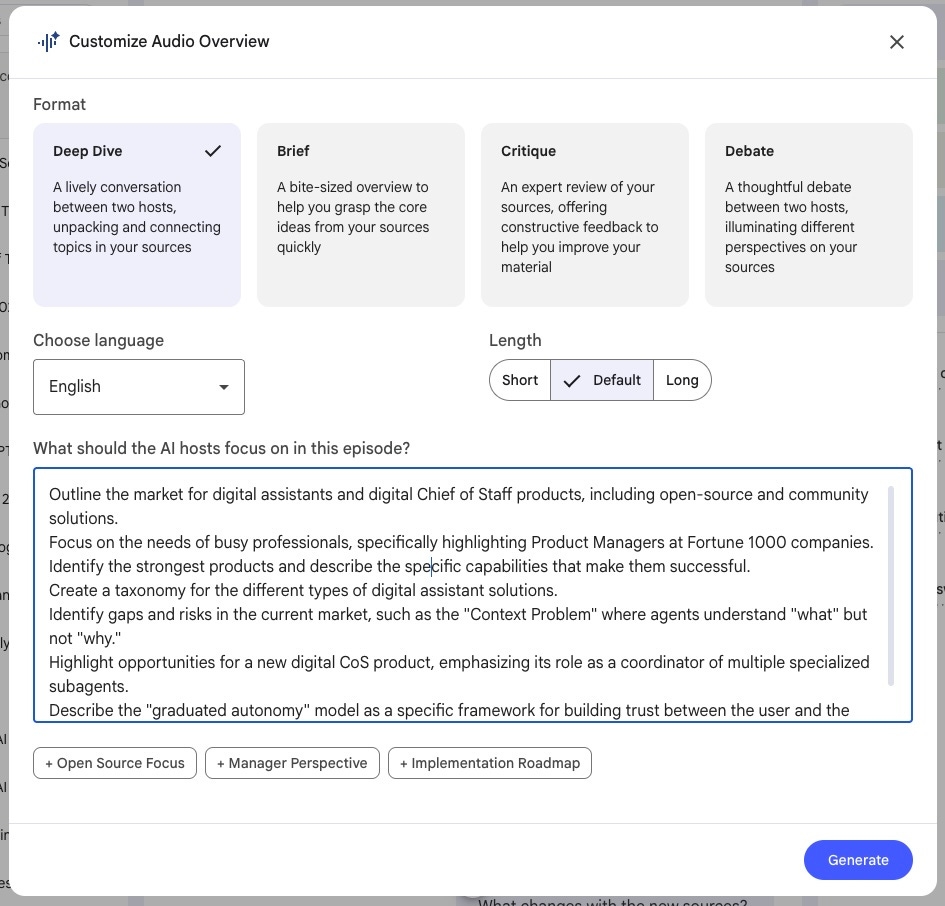
Before generating, you can give NotebookLM a prompt to shape the conversation. “Concentrate on the competitive positioning angles” or “keep this accessible for someone without a technical background” actually influences what the hosts discuss. Length is adjustable: shorter, default, or longer (the latter in English only). When it’s done, the audio is downloadable and goes wherever you go.
The other formats are worth knowing: The Brief is a single-speaker, under-two-minute version for when you need the quick take. The Critique has two hosts evaluate a specific document, useful if you want a spec or design doc stress-tested out loud before a review. There’s a Debate format for sources where genuine opposing perspectives exist. I mostly use Deep Dive.
Here’s what this changes in practice. Sources I’d otherwise read over two hours, I hear in about twenty minutes. I retain more from a conversation than from a stack of documents that weren’t written to connect with each other. The listening happens during time that was already spoken for: the morning walk, the commute, the gym session. That’s reclaimed absorption time, not additional work time.
Interacting with the Hosts
The audio isn’t just playback. You can join it.
NotebookLM’s interactive mode lets you enter the conversation while it’s running. While the hosts are talking, you press a button, ask a question out loud, and they answer it, grounded in your uploaded sources, then resume where they left off. Your voice, not typed. The hosts respond to your specific question with a specific answer drawn from what you gave them.
When something comes up in the conversation that I want to push on or understand better, I ask. If the hosts are discussing a competitor’s pricing structure and I want to understand the strategic logic behind it, I interrupt and ask them to walk me through it. They pull from the sources I loaded, give me a specific answer, and continue.

It’s the difference between a podcast and a tutor who happens to have read everything in your source pile.
Interactive mode is currently English-only and only works on newly generated audio overviews. Both are worth knowing before you try to rely on it for a non-English team or try to reuse an old audio file.
A Competitive Research Sprint, in Practice
Here’s a concrete scenario to make the workflow tangible.
A PM is evaluating a product opportunity: a digital Chief of Staff for busy executives. Before she can say anything meaningful about differentiation, pricing, or where the market is underserved, she needs a clear picture of who else is in the space.
Her research starts before she opens NotebookLM. Rather than crawling individual competitor pages one at a time, she runs several Gemini Deep Research queries first: one on the direct competitor landscape for AI executive assistants, one on community and open-source DIY solutions, one on analyst perspectives on the AI productivity market. Within minutes she has multi-page synthesized reports from across the web for each topic. These become the backbone of her source collection.
From there she layers in more targeted material: specific competitor pages for pricing details, analyst reports from Sequoia and a16z, Reddit and Slack threads where people share what they’ve built themselves. By the time she’s done, she has over 70 sources. The problem: NotebookLM caps notebooks at 50. Her fix is to use Claude to consolidate the research into four combined documents: Tier 1 direct competitors, Tier 2 indirect competitors, Tier 3 community solutions, and Tier 4 analyst data. She also generates a combined Tier 1-2 summary document. Five uploads. Seventy-plus original sources, all represented.
She creates a notebook called “AI Executive Assistants Competitive Analysis,” loads the five targeted source files and the Deep Research files, and opens chat. NotebookLM immediately generates a summary of her sources and surfaces three suggested follow-up questions based on what it found in them. The third one: “Compare the pricing models for the top AI productivity agents.” That’s exactly what she needs, so she selects it.
The response is specific. NotebookLM leads with a headline finding (freemium is the dominant go-to-market strategy, used by 10 of the top 15 companies) then organizes the market into four categories.
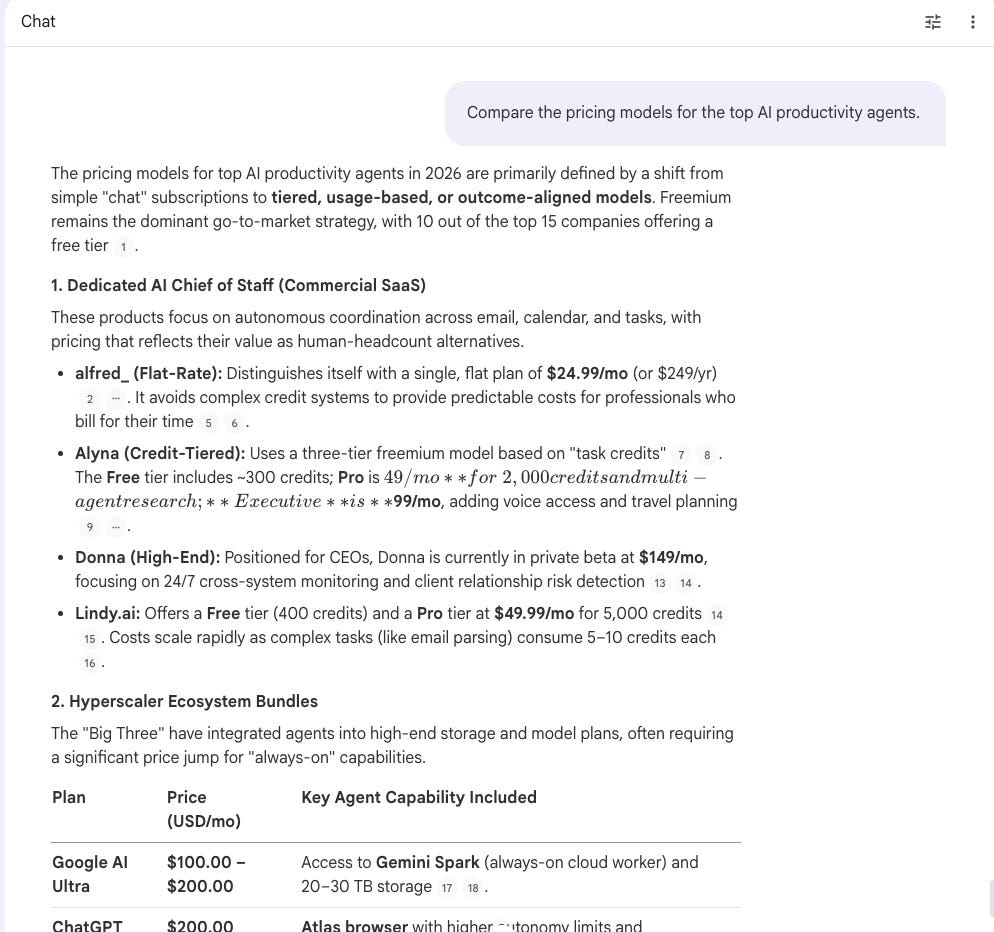
Dedicated AI Chief of Staff products span a wide range: alfred_ at a flat $24.99/month for professionals who want predictable costs; Alyna’s three-tier freemium model topping out at $99/month for voice access and travel planning; Donna, positioned at the high end for CEOs, in private beta at $149/month. Hyperscaler Ecosystem Bundles have emerged as a second category: Google, OpenAI, and Anthropic have all started bundling background agent capabilities into their top subscription tiers, which converge around $100-$200/month. Specialized “Wedge” and Point Solutions form a third tier, including Sai by Simular with its unusual per-computer pricing model rather than per-user, and meeting agents like Fellow and Granola with more modest entry points. The fourth section covers Strategic Trends: the shift toward credit-based pricing as API costs for advanced models rise, the “context moat” that tools like Littlebird build by learning passively from your screen, Gartner’s prediction that outcome-based pricing (paying per workflow completed, not per seat) becomes dominant by 2028, and the extreme spread in DIY costs. Community no-code setups can run as low as $25/month, while high-autonomy custom systems can reach $8,000/month.
Every section cites the exact source passage it drew from. She clicks a few citations to verify. All check out.
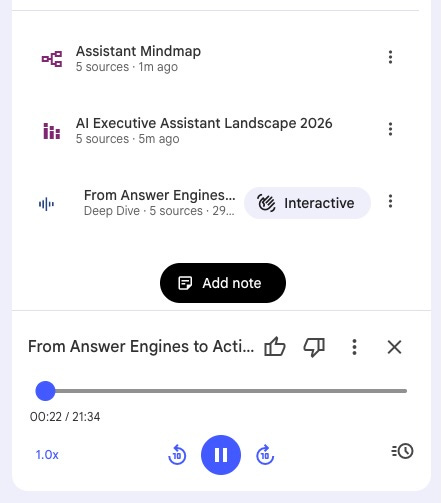
From the Studio panel, she generates three more outputs. A mind map NotebookLM labels “Assistant Mindmap.” An infographic titled “AI Executive Assistant Landscape 2026.” And a slide deck in Presenter Slides format, using the prompt “An overview of the competitive landscape for digital chief of staff solutions to present to stakeholders.” The slide deck generates ready for her product review. The infographic she’ll embed in the written brief. The mind map she keeps open for her own thinking. Three views of the same competitive territory, each built for a different use.
Then she generates an Audio Overview.
Before she hits Generate, she writes a detailed brief for the hosts. She wants them to cover the full market taxonomy, with a specific focus on the needs of busy professionals, particularly PMs at Fortune 1000 companies. She asks them to identify the strongest products and describe what actually makes them successful, flag the gaps and risks in the current market (specifically the “Context Problem,” where today’s agents understand what to do but not why), and highlight the opportunity for a new product positioned as a coordinator of specialized subagents rather than a single do-everything tool. She also asks them to describe the “graduated autonomy” model, a framework for building trust between user and agent incrementally, as a specific design direction worth exploring.
Then she starts it and heads out for her afternoon walk. NotebookLM titles the overview “Building an autonomous digital chief of staff.” Over the next twenty-plus minutes, two AI hosts work through everything her sources collectively say about this market. This is the synthesis that reading alone doesn’t produce, because none of her 70-plus original sources were written to connect with each other.
You can listed to the Audio Overview here.
A couple of minutes in, she taps the interactive mode button. Her question: “How is the community solving this with DIY solutions?”
The hosts respond to her and start talking about DIY solutions like OpenClaw and Dex. They also talk about how people are building their own solutions with Claude Code. After about 2 minutes on community solutions, they tie back to where they left off, talking about commercial solutions. She asks two more questions during the walk: one about enterprise adoption timelines, one about which features are still considered genuinely differentiated versus table stakes. Both answers come back grounded in the analyst material she uploaded. By the time she’s home, it feels less like she listened to a summary and more like she was a guest on a podcast that happened to be about her exact research area.
Back at her desk, she types one more question into chat: “What is the best solution under $40 per month?” NotebookLM pulls the pricing data from her Tier 1 and Tier 2 sources and gives her a direct answer with citations.
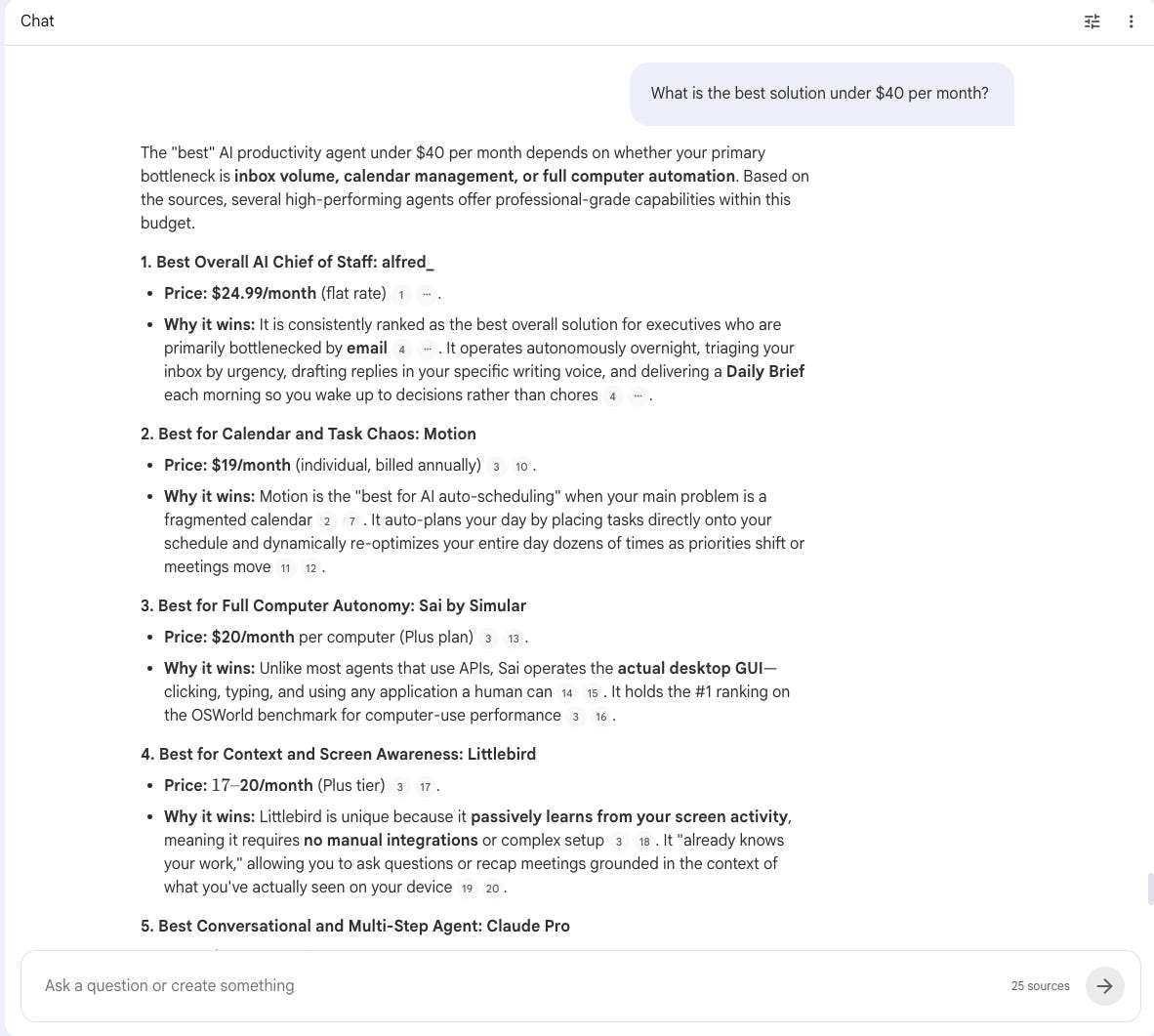
That’s the whole workflow: research gathered outside NotebookLM, organized and loaded in, then engaged with through chat, visual outputs, and audio. The tool didn’t find those 70 sources. But once they were in, it became something she could actually have a conversation with rather than a pile of files she had to get through.
The same pattern applies to other PM research needs: monthly team status synthesis, user research consolidation, keeping current on a fast-moving technical area. The sources change, the mechanics stay the same.
The Honest Limitation
NotebookLM’s grounding is its strength…and its constraint. It doesn’t have visibility into what it doesn’t know. If you ask about something your sources don’t cover, it tells you it can’t answer. It won’t proactively flag that a document you didn’t include would have changed the picture. Source curation is entirely your job, and the quality of what goes in directly determines the quality of what comes out. A Deep Dive built from three thin web articles won’t give you much. Load substantive sources (full transcripts, primary documents, actual reports) and the conversation reflects that.
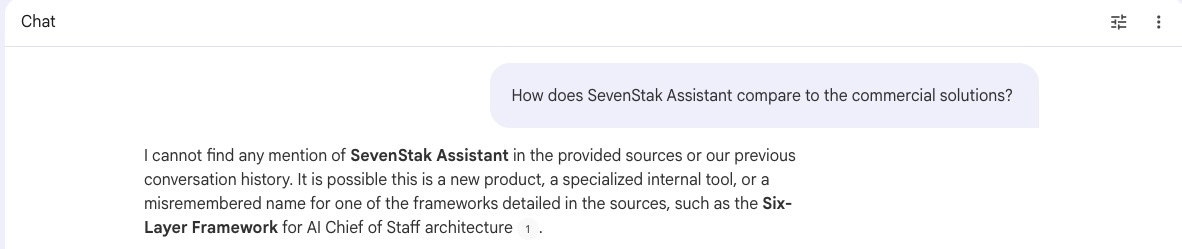
The other thing worth noting: NotebookLM can only see one notebook at a time. There’s no cross-notebook awareness. If you’re building separate notebooks for different projects, you’ll need to think intentionally about what belongs where.
What You Should Do: Try It This Week
NotebookLM is free with a Google account at notebooklm.google.com.
Pick one thing you’re currently trying to synthesize: a competitive space you’re getting up to speed on, a stack of team updates you haven’t had time to read, a research study sitting in your downloads folder. Create a notebook, upload your sources, and generate a Deep Dive.
Then take a walk.
No workflow to design first. No system to set up. The only question worth answering on the first try is whether this works for how your brain absorbs information. If it does, the use cases stack up from there.
Pro Tip: Start with Gemini Deep Research
The PM in the scenario above didn’t start by crawling competitor pages. She started with Gemini Deep Research.
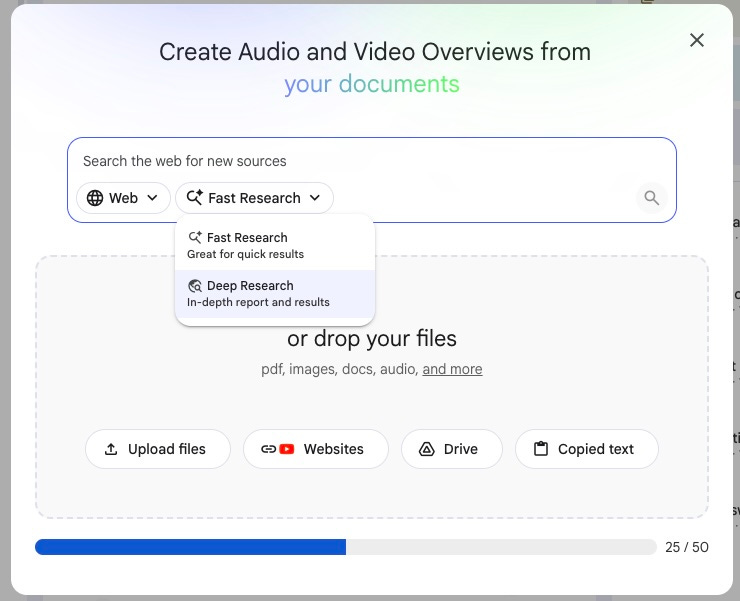
Deep Research, available at gemini.google.com, is an agentic research tool that autonomously browses hundreds of websites on a topic and produces a synthesized multi-page report in minutes. Those reports make substantially better NotebookLM sources than individual web pages. They arrive pre-synthesized, which gives the Audio Overview richer material to work from. The competitive analysis, community solutions overview, and analyst perspective documents in the scenario all started as Deep Research outputs before anything hit NotebookLM.
Deep Research is also available directly inside NotebookLM’s Sources panel, so you can run it without leaving the notebook and import the results straight into your source collection.
PM Power Tools is an occasional series on specific tools worth adding to your PM toolkit.







Leave a Reply