Most PMs have used ChatGPT or Claude to answer a question or draft a document. That’s prompting. There are two more levels above it, and they’re where the real leverage is.
If you’ve been using AI tools for the past year or two, you probably have a sense of how powerful a good conversation with an LLM can be. You’ve typed a prompt, gotten a useful response, and maybe even gotten pretty good at getting the output you want on the first try. That’s a real skill, but it’s also just the first rung on the ladder.
Thanks for reading! Subscribe for free to receive new posts and support this community.
There are three fundamentally different ways to work with AI: prompting, skills (also called Gems in Gemini or Custom GPTs in OpenAI), and agents. Each one unlocks more capability, and more autonomy. Understanding the differences helps you pick the right tool for the job, and gives you a roadmap for where to invest your time as these capabilities become central to how product teams work.
Level 1: Prompting (The Conversation)
Prompting is what most people mean when they say “I use AI.” You open a chat interface, type a request, and get a response. It’s powerful because the base models are genuinely capable, but every session starts fresh. There’s no memory of what you did last week, no consistent persona, and no continuity between conversations.
The quality of what you get back is almost entirely determined by the quality of what you put in. Vague prompt, vague answer. This is why “prompt engineering” became a thing. It’s the craft of writing instructions that reliably produce useful output.
A good prompt has a few key elements:
- Role: Tell the AI who it’s supposed to be. “You are a senior product manager with deep experience in B2B SaaS.”
- Context: Give it the relevant background. “We are preparing for a quarterly business review with our enterprise customers.”
- Task: Be specific about what you want. “Write a 3-paragraph executive summary of the following metrics data, focusing on trends, not just numbers.”
- Constraints: Tell it what to avoid. “Do not use jargon. Write for a non-technical audience.”
Worth noting as we go deeper: Role and Context reappear in the framework for skills and agents. Constraints gets split into two more precise things: Scope (what the AI does and doesn’t do) and Error Handling (what it does when things go wrong). Tone and Format, which most one-off prompts skip, become two of the most important components when you want something that runs consistently. That’s the bridge to skills.
Level 2: Skills (The Specialized Persona)
A Skill (Claude), Gem (Gemini), or Custom GPT (OpenAI) is essentially a saved, reusable prompt that defines a persistent persona. Instead of typing out your role and context and constraints every time, you bake them into a “system prompt” that runs automatically at the start of every conversation.
Writing a good prompt is like briefing a consultant every time they walk in the door. Building a skill is like hiring a specialist who already knows your business, your style, and your preferences. You just tell them what you need today.
Tweet
A well-built skill addresses six factors:
- Role defines what the AI is and how it should behave. Not just a job title, but a disposition. An experienced PM who pushes back is different from a helpful assistant who agrees with everything.
- Scope defines what the skill does, what it doesn’t do, and when it stops. Most people write the first part and skip the other two.
- Context is the situational intelligence you give the skill about its environment: who it’s talking to, what they already know, what stage of work they’re in.
- Tone defines the register. Peer-level and willing to challenge is a very different thing than polite and accommodating.
- Format specifies the structure of the output. Tone is how the skill sounds. Format is how the output is shaped: a structured document, a one-paragraph summary, a bulleted list.
- Error Handling defines the default behavior for uncertainty. If the input is unclear or incomplete, does the skill guess, over-qualify, or ask a clarifying question? For most PM-facing skills, the answer should be: ask.
Here’s a simple example for a PM-focused skill:
Role: You are an experienced product manager writing assistant who helps teams write clear, customer-focused requirements. You push back when thinking is vague or untested.Scope: You help with PRDs, user stories, and requirements documents only. You do not advise on prioritization, roadmaps, or go-to-market strategy. When a document is complete and the user confirms it, stop.Context: The user is a product manager, likely in early definition stages. Documents will be reviewed by engineering and design. Assume familiarity with product concepts but not necessarily the specific format you're producing.Tone: Peer-level. Direct, willing to challenge weak assumptions. Don't validate incomplete thinking just to be encouraging.Format: A structured document with clearly labeled sections: Problem Statement, Target User, Success Criteria, and Out of Scope. Use plain headers. Keep each section to 2-3 sentences unless the complexity requires more.Error handling: If the feature idea is unclear, ask one clarifying question before writing. Don't produce a document based on incomplete input.
That’s a skill. It’s not code. It’s not complicated. It’s a clear set of instructions that shapes every conversation you have with that AI instance, consistently, without you having to repeat yourself.
Skills are great for recurring tasks where you want consistent output: writing PRDs, summarizing research notes, drafting stakeholder updates, reviewing meeting transcripts. The pattern is: you bring the content, the skill brings the expertise and the format.
The ceiling here is that skills are reactive. They wait for you to show up with something. They don’t go do things on their own, and they can’t interact with your other tools unless the platform explicitly supports it. That’s where agents come in.
Level 3: Agents (The Autonomous Worker)
An AI agent isn’t a smarter chatbot. It’s a fundamentally different kind of system. Where a skill transforms input into output, an agent pursues a goal, repeatedly deciding what to do next, using tools to take action, checking results, and iterating until the job is done.
The same LLM (Claude, GPT-4, Gemini) that powers a skill can power an agent. The difference is the environment around it. An agent has tools: the ability to browse the web, read and write files, call APIs, send emails, update databases. It has a feedback loop, checking its own output and trying again if something isn’t right. And it has triggers: it can be activated by an event (a new email arrives, a ticket is created, a threshold is crossed) rather than just a manual prompt.
But here’s what most people miss: every agent still needs the same six components at its core.
Role tells the agent what it exists to do and what disposition to bring to the work. Without a clear role, the agent optimizes for the wrong thing.
Scope is even more critical in an agent than in a skill. A skill that goes off-topic is annoying. An agent that goes off-scope can take actions in the world you didn’t authorize. Define what it does, what it doesn’t do, and crucially: when it stops.
Context helps the agent understand the environment it’s operating in: who triggered it, what state things are in, what a successful run looks like. An agent running on a Monday-morning schedule needs to know it’s producing a brief for time-constrained executives, not a comprehensive research document.
Tone shapes how it communicates results. An agent that dumps raw data when you needed a summary failed, even if the data is accurate.
Format specifies the structure of the output, which is distinct from tone. Tone is how the agent sounds. Format is how the output is shaped: a structured document, a bulleted summary, a JSON payload, a one-paragraph brief. For agents feeding output into other systems or people’s workflows, this is often the most operationally important component.
Error handling is the difference between an agent that stops and asks when something unexpected happens versus one that confidently barrels forward and makes a mess. For most agents, the default should be: pause, flag the issue, and wait for a human. That means being explicit about escalation – when the agent hits a wall, who does it notify, through what channel, and with what information. “Flag for a human” is incomplete without answers to those questions.
Here’s what all six look like in practice. Imagine you want a weekly competitive intelligence brief. With prompting, you do it manually. Find the articles, copy them in, ask for a summary, repeat next week. With a skill, you make the summarization faster and more consistent. With an agent, you set the goal once and it handles the rest, every week, without you touching it. Here’s what the six-component brief for that agent looks like:
Role: You are a competitive intelligence analyst monitoring news and product announcements for a B2B SaaS company. Your job is to surface what matters, not summarize everything.Scope: Review news, blog posts, and product release notes for three specified competitors. Flag product announcements, pricing changes, and leadership updates only. Do not include general industry news or analyst commentary. Stop when the brief is complete and sent.Context: This brief runs every Monday morning and goes to a product leadership team. They are time-constrained and already know the competitive landscape. They want to know what changed, not what is.Tone: Concise and direct. Lead with the most significant update. Plain language. No marketing language from competitor materials.Format: A short brief, no longer than one page. One-sentence summary of the most significant change at the top. One paragraph per competitor, only if there is something to report. Plain text, no headers or formatting beyond line breaks.Error handling: If no significant updates are found, say so clearly ("No material changes this week") rather than padding the brief. If a source is unavailable, note it and continue with what is accessible. If the run cannot be completed, send a failure notification to the product lead via Slack with a brief description of what went wrong.
The tradeoff is complexity. Agents require more setup (connecting tools, defining what “done” looks like, handling edge cases when something unexpected happens). They’re not no-code (yet), and they can take actions that are hard to undo. You don’t deploy an agent the way you deploy a skill. You test it carefully, you scope it tightly, and you make sure a human is in the loop for anything consequential.
Putting It Together
Here’s a simple way to think about which approach fits which problem.
Prompting is the right call for one-off tasks: you’re exploring an idea, you need something quickly, and you don’t mind setting context each time. Build a skill when you do the same type of task regularly and want consistent output without re-briefing the AI every session, or when you want others on your team to get reliable results without becoming prompt experts. Build an agent when you have a multi-step process that runs on a schedule or trigger, involves data from multiple systems, and would benefit from running without human intervention.
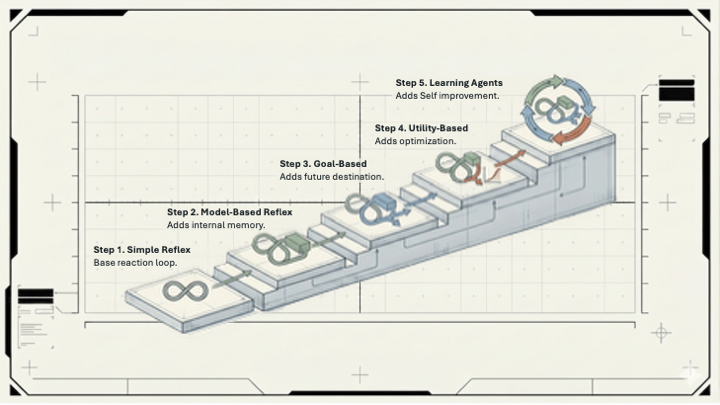
The thing most PMs miss is that these aren’t in competition. They’re a progression. Every good agent has a strong skill at its core. Every good skill is built on solid prompt engineering fundamentals. You can’t skip the first two levels and jump to agents and expect it to work.
Where to Start
If you’re just getting into this, the best investment you can make right now is building one skill. Pick something you do repeatedly (summarizing customer feedback, writing release notes, prepping for weekly status meetings) and write a system prompt for it. Spend 20 minutes. Iterate.
The scaffolding around an agent is more sophisticated. The foundation is the same. A working skill is the best preparation for thinking about what an agent needs.
The teams that will win with AI aren’t the ones who use it the most. They’re the ones who understand it well enough to deploy it at the right level for the right problem.
Start with a prompt. Build a skill. Think about agents. In that order.






Leave a comment